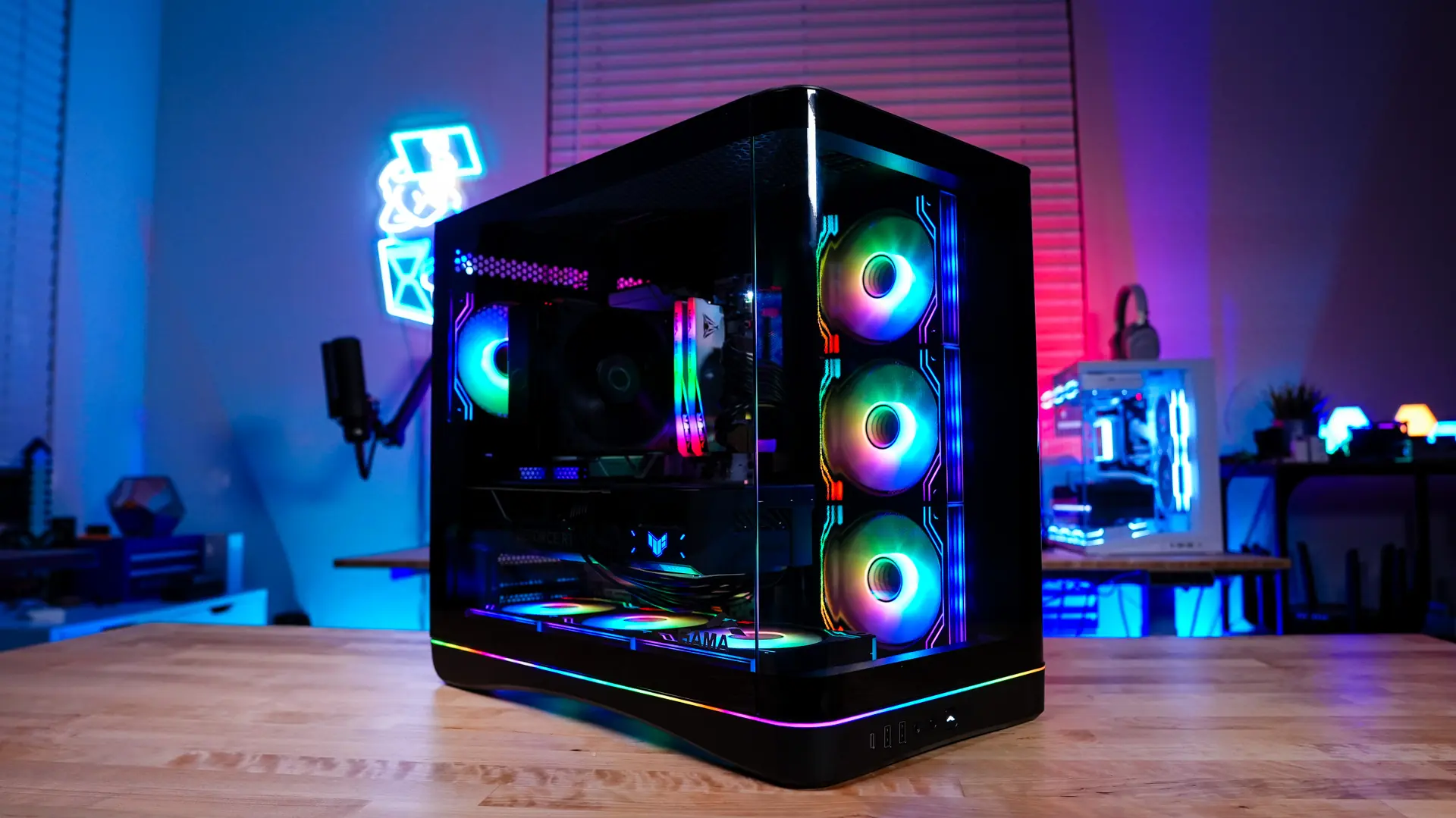
SAMA is a brand we have recently encountered, which has served as an OEM for many major brands over the years. They have started producing products for the retail market under their own name, and last year we had the opportunity to review the L70 360 WH Liquid CPU Cooler and the A60E CPU Cooler. Both turned out to be solid products at a good price. Today, we are reviewing SAMA's first case, the V62. This mid-tower case comes with a panoramic curved glass design, seven ARGB fans, and much more! Will you choose this case for your next build? Let's go ahead and explore together!
Special thanks to SAMA for the V62 case review.
Technical Specifications of SAMA V62 PC Case
Packaging of SAMA V62 PC Case
SAMA V62 comes in a standard PC case box. The front indicates that we have received the black version of the V62.
When we opened the box, the case was nicely protected with large styrofoam pieces and plastic. This ensures that the case arrives without damage.
General Overview of SAMA V62 PC Case
At first glance, I can describe the SAMA V62 as a compact mid-tower case. The official dimensions are stated as 422x285x460mm (H×W×D). We received the black version of the case, but a white version is also available.
This will be a standard aquarium-style PC case with a large front panel window and side panel window. The front panel is actually a curved panel, but it is split from where the side panel starts instead of being a single piece. This offers a column-free design that provides a good view of your system.
On the front of the case, there is a tempered glass panel that provides a direct view of your system. Below the panel, there is a large power button, a smaller LED button, a combination headphone/microphone jack, two USB 3.0 Type-A ports, and one USB 3.2 gen 2×2 Type-C port.
Moving to the top of the case, there is a ventilated and removable magnetic filter. When we remove this filter, we find a cooling bracket that supports radiators up to 360mm with three 120mm fans or two 140mm fans.
On the main side of the case, there is a second tempered glass panel. This allows you to showcase your system completely. There is a small SAMA logo in the corner of the panel. On this side of the case, we can see the design of the case's feet. In the middle, there is an opening that allows air to flow underneath the case.
When we move to the back of the case, there is a fairly standard design showing the case's dual-chamber design. There is a bit of extra ventilation at the top of the case, followed by a 120mm ARGB exhaust fan, motherboard mounting, and power supply mounting on the opposite side.
The opposite side panel of the case is a normal steel panel, but there is ventilation for your side-mounted and power supply.
A Look Inside the SAMA V62 PC Case
It is quite easy to remove the main side panel of the case and get inside. There are two thumb screws holding the side panel, so all you need to do is remove them and slide the panel off. Note that these thumb screws are not fixed, so be careful not to lose them! Once we remove the side panel, we can see how the main section of the case is designed.
When you enter the case, the first thing you will notice is the included ARGB fans. There are a total of seven 120mm ARGB fans; three are on the side mount, three are at the bottom of the case, and one is at the back, which we mentioned earlier. These fans come with an infinite window on both sides and a window in the middle of the fan. You need to remove three protective film pieces (for each fan), which can be a bit annoying. Also, since these fans are already mounted, it can be a little tricky to remove the protective film on some sides of the fans. The side mount supports 280mm radiators, while the bottom mount supports 360mm radiators.




Comments
(7 Comments)